When pages stay in a discovered-but-not-crawled state, the problem usually starts earlier than teams expect. The search engine already knows the URL exists, but it still has not decided that fetching the route is worth the time, resources, or priority right now, which Google's crawling and indexing documentation frames as a question of fetch demand rather than awareness.
Updated for April 2026, this article reflects how Googlebot currently allocates fetch priority on large dynamic sites and how that interacts with Search Console's coverage states.
That is why this status is not the same as a quality judgment on the page itself. It is a prioritization problem first. The crawler may be seeing too many low-value URLs, too many duplicate paths, slow response behavior, or a discovery graph that does not make the route look important enough to fetch quickly.
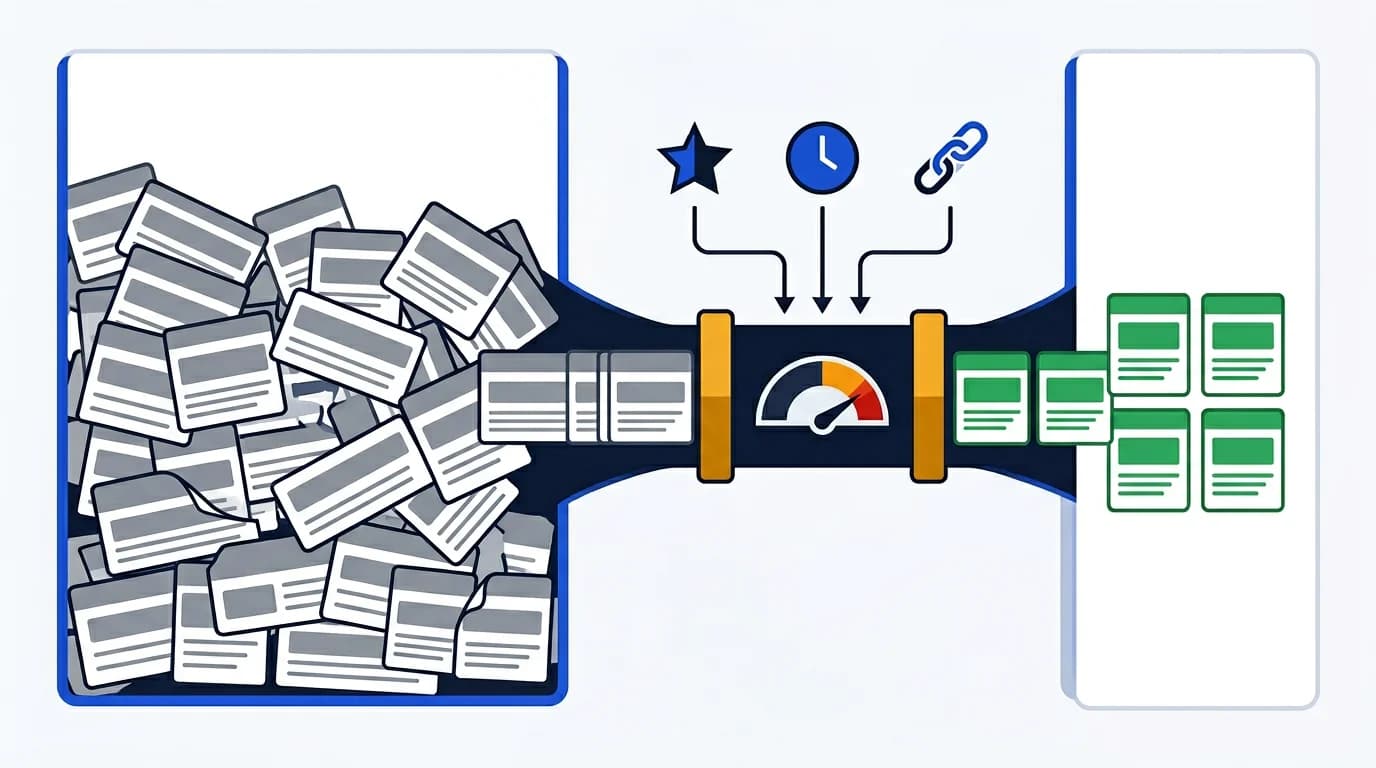
This article explains why pages get discovered without being crawled, how modern website architecture makes the problem worse, and how technical teams should diagnose route-level discovery loss before assuming the issue is content quality.
What discovered but not crawled usually means
This state usually means the URL entered the search engine's awareness through one or more discovery channels, but it has not yet earned enough fetch priority to move deeper into the processing pipeline.
Those channels often include:
- XML sitemaps
- internal links
- external links
- previous crawl paths
- template-generated route patterns
The important point is that the route is not invisible. It has been seen. It just has not been fetched with enough urgency.
Why this is different from crawled but not indexed
The distinction matters because the recommended fixes are often different.
- discovered but not crawled usually points to crawl prioritization, discovery quality, or infrastructure constraints
- crawled but not indexed more often points to duplication, weak page value, or unstable machine-facing output
That is why this article sits next to crawl budget optimization and why pages are crawled but not indexed, but it does not duplicate either one. This status is about fetch demand and crawl selection before the route is fully evaluated.
Crawl prioritization is the real bottleneck
Search engines cannot fetch every discovered URL immediately. They prioritize, as explained in Google's large-site crawl budget guide. If the site creates too many weak or repetitive URLs, important pages can wait in line behind noisy inventory.
Common crawl-priority drains
The biggest crawl-priority drains usually include:
- parameterized duplicate URLs
- faceted navigation with little unique value
- endless paginated states
- internal search pages
- slow or unstable route responses
- large numbers of low-value programmatic pages
When those patterns grow, the crawler has to be selective. High-value pages can still be delayed simply because the overall URL environment is too expensive or too ambiguous.
Sitemap quality can create discovered-but-not-crawled problems
Sitemaps help discovery, but they can also create noise when they expose too many URLs that do not deserve prompt crawl attention.
Sitemap problems that hurt fetch demand
Common sitemap-driven problems include:
- listing redirected or non-canonical URLs
- including thin or low-priority templates
- exposing parameterized duplicates
- leaving stale routes in the inventory
- pushing too many weak pages into crawler awareness at once
This is why sitemap quality affects more than cleanliness. It shapes crawl demand. The sitemap guide on XML sitemap structure and indexation control goes deeper on that system.
Weak internal linking lowers fetch priority
Even when a route appears in the sitemap, internal linking still matters. Pages that receive little architectural support often look less important than well-linked templates.
The crawler pays attention to signals such as:
- how often the route is linked internally
- where those links come from
- whether the anchor context explains the destination clearly
- how many clicks separate the page from strong hub pages
If an important route is buried behind weak navigation or isolated in low-value template areas, it can remain discovered but not crawled simply because the site is not reinforcing its importance.
Response quality still affects whether the crawler wants to come back
Discovered-but-not-crawled is not only about URL count. It can also reflect response behavior. If the crawler has seen that the site is slow, unstable, or full of dead ends, it may slow down further fetching decisions.
Response signals that slow crawl frequency
That usually overlaps with:
- long response times
- redirect chains
- soft
404behavior - temporary outages handled poorly
- unreliable rendering paths
This is why the status often touches HTTP status codes for SEO as well as crawl budget. Fetch decisions depend partly on whether the crawler expects good returns from spending more time on the site.
JavaScript-heavy routes often look expensive before they are even crawled
Modern JavaScript sites increase the risk because the crawler may already interpret the site as expensive to process. If many routes depend on heavy rendering, hydration, or delayed content assembly, the system can become more selective about what it chooses to fetch next.
What crawlers weigh on JavaScript sites
That does not mean every JavaScript site is doomed. It means crawl prioritization becomes more sensitive to:
- route importance
- machine-facing HTML quality
- response speed
- duplication across templates
- whether prerendering or stronger server output reduces fetch cost
This is one reason Next.js rendering decisions and prerendering route selection matter beyond classic rendering debates. Better machine-facing delivery can make important routes more worth fetching.
Discovery noise often comes from template-level sprawl
The strongest diagnosis usually comes from grouping affected URLs by template rather than by single examples. If one page is discovered but not crawled, the whole route family may be contributing to the problem.
Warning signs of template sprawl
Warning signs include:
- large template families with minor variations
- location or facet pages generated at scale
- archives with weak differentiation
- product combinations or filter states that multiply quickly
- listing routes that endlessly expand through pagination or JS interactions
This is where the pagination and inventory cluster connects directly. Routes do not compete alone. They compete as a family.
What to diagnose first
The best workflow usually starts with the systems that shape fetch demand:
- Review sitemap exposure for the affected route family.
- Check how the pages are linked internally.
- Look for duplicate or parameterized variants around the same templates.
- Review response quality, redirects, and failure rates on representative routes.
- Compare the affected family against stronger templates that do get crawled, using Search Console's URL Inspection tool to confirm fetch and rendering status on representative URLs.
This approach separates discovery problems from content-quality problems. A route that has never been fetched should not be diagnosed as if it already failed the full indexation review.
Where prerendering helps and where it does not
Prerendering can help when an important route family is expensive to render and weak in machine-facing HTML. It can improve crawler efficiency on high-value templates by making the response easier to consume.
It does not solve discovery noise by itself. If the site keeps generating huge numbers of low-value URLs, broken sitemap entries, or duplicate states, prerendering will not magically make those routes deserve crawl attention.
Pair prerendering with cleanup
That is why teams should use prerendering selectively, alongside:
- URL cleanup
- sitemap cleanup
- internal linking improvements
- stronger route prioritization
Practical fixes that usually help
Once the cause is clear, the highest-leverage fixes usually include:
- reduce low-value URL variants
- clean the sitemap inventory
- improve internal linking to important route families
- remove redirect chains and unstable dead-end routes
- improve response quality on high-priority templates
- use prerendering where machine-facing cost is too high for bots
The strongest teams do not try to "force crawling" abstractly. They make the important routes easier to discover, easier to trust, and easier to fetch efficiently.
Validation after changes
After fixes ship, teams should re-check whether the affected route family is moving deeper into the pipeline.
Validation checks worth running
Useful validation includes:
- whether the cleaned URLs remain in the sitemap
- whether internal links now support the route family more clearly
- whether response quality improved on sampled pages
- whether crawler tools can fetch the routes cleanly
- whether fewer weak route variants keep entering discovery
Useful support includes a crawler checker, an extract sitemap tool, and an SEO audit tool.
| Root cause | Typical signal | Best first fix |
|---|---|---|
| Discovery noise | Too many weak URLs in sitemap or links | Clean URL inventory and sitemap policy |
| Weak internal linking | Important routes feel isolated | Strengthen architectural links from stronger hubs |
| Slow or unstable responses | Crawlers fetch cautiously | Improve response behavior and remove dead ends |
| Expensive JS-heavy routes | Important templates look costly to process | Improve machine-facing output or prerender selectively |
Conclusion
Pages stay discovered but not crawled when the search engine knows they exist but does not see enough reason to spend fetch capacity on them yet. On modern websites, that usually means discovery systems, crawl prioritization, and route-family quality need to be diagnosed together.
The strongest fix is not one trick. It is a cleaner environment: fewer weak URLs, better sitemap hygiene, stronger internal linking, healthier response behavior, and clearer prioritization for the templates that actually matter.
Content Cocoon
Discovered Not Crawled Editorial Cluster
This article should connect discovery loss back to crawl prioritization, sitemap quality, internal linking, response behavior, and the broader technical SEO systems that determine which URLs earn fetch attention.
Internal Pathways
Crawl Budget Optimization
A companion article for understanding why some URLs never earn enough fetch attention to move deeper into the pipeline.
XML Sitemap Guide for Technical SEO
Useful when sitemap quality and URL inventory are shaping which routes are discovered but still not fetched.
Why Pages Are Crawled but Not Indexed
The adjacent diagnosis for routes that do get fetched and evaluated but still fail the indexation test.
Technical SEO Audit
The parent service for teams reviewing crawlability, route discovery, rendering, and indexation quality together.
External Technical References
Crawler Checker
Helpful for testing whether important URLs are fetchable and how crawlers experience the route directly.
Extract Sitemap Tool
Useful for validating whether discovery sources are exposing the right URLs in the first place.
SEO Audit Tool
A supporting reference when discovery loss overlaps with redirects, metadata, and rendering quality.
Frequently Asked Questions
What does discovered but not crawled usually mean?+
It usually means the search engine knows the URL exists but has not prioritized fetching it yet, often because of crawl demand, URL quality, sitemap noise, or weak route importance signals.
Is discovered but not crawled the same as crawled but not indexed?+
No. Discovered but not crawled is an earlier-stage prioritization problem, while crawled but not indexed usually means the route was fetched and evaluated but still did not pass the quality or usefulness threshold.
Can sitemaps cause discovered but not crawled problems?+
Yes. Weak sitemaps can flood crawlers with too many low-value, duplicate, or stale URLs, which dilutes fetch attention for the routes that matter most.
Can prerendering help with this status?+
It can help when important routes are expensive to process because of weak machine-facing HTML, but it does not fix discovery noise, duplicate URL sprawl, or poor sitemap policy on its own.