Prerendering helps when modern frontend delivery makes crawler-facing HTML too thin, too delayed, or too inconsistent for stable search visibility. The decision to add prerendering is one of the highest-leverage rendering choices a JavaScript-heavy site can make in 2026, but it is also one of the most over-applied. Some sites genuinely need it. Some sites buy a managed prerendering plan and discover six months later that their existing framework already shipped complete HTML to crawlers and the new layer was duplicate work.
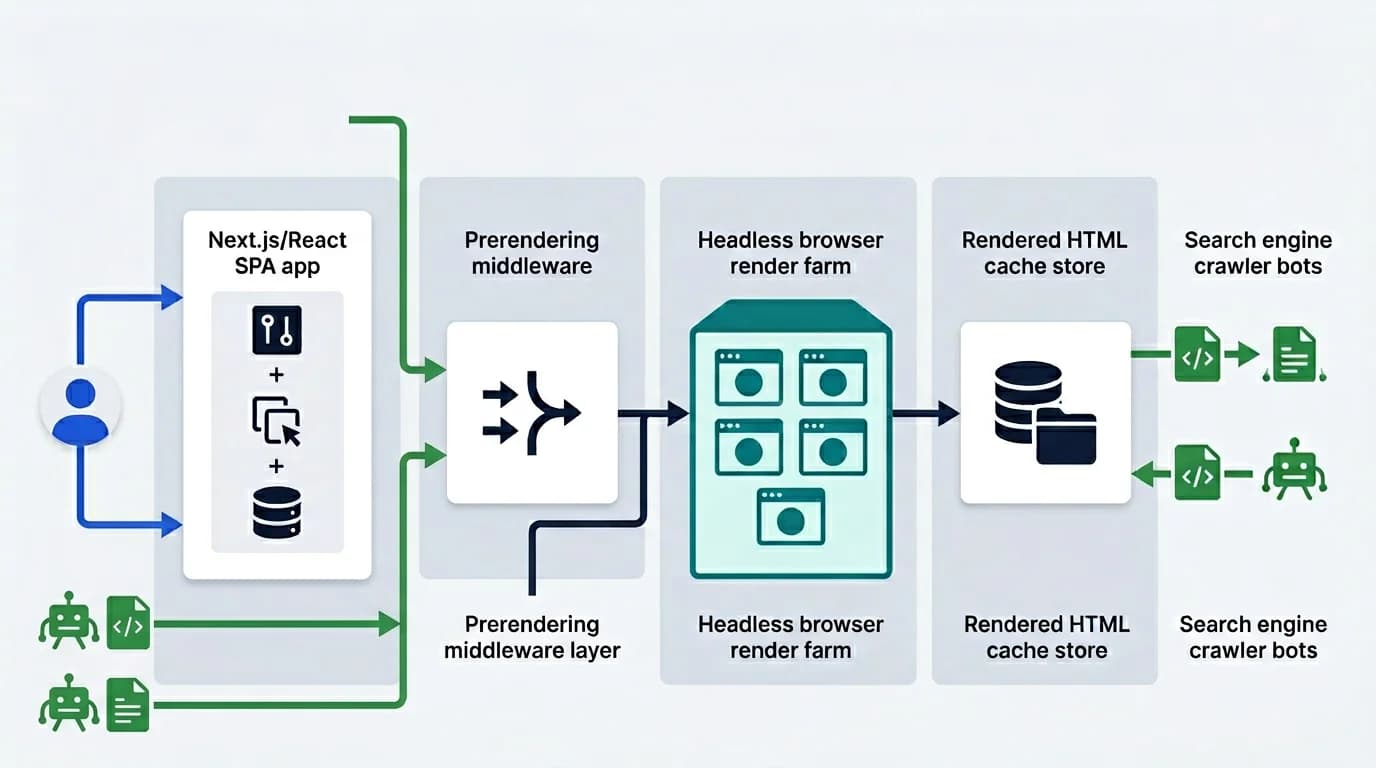
Prerendering is the bridge between a JavaScript-heavy delivery layer and the deterministic HTML that crawlers, answer engines, and AI extraction pipelines depend on. Done right, it strengthens both classic SEO and AI visibility without rebuilding the application. Updated for April 2026, this guide reflects how prerendering currently fits alongside SSR and React Server Components in real-world rollouts, and where teams should pause before committing to a layer that often costs more in operational complexity than it earns back in indexation. The framing pairs with the broader JavaScript SEO service work, the technical SEO audit diagnostic, the AI search visibility program, and the operational discipline covered in crawl budget optimization for JavaScript sites.
What Prerendering Solves
Prerendering solves the gap between a JavaScript application and the deterministic HTML crawlers need, a delivery shape positioned clearly in web.dev's rendering on the web overview. Instead of forcing search engines to reconstruct meaning from delayed client-side execution, prerendering delivers a stable snapshot that already contains the important structure and content. This is why it often sits between JavaScript SEO and AI search visibility in a technical search strategy.
That stability matters for indexation, metadata consistency, structured data, and downstream extraction by AI-driven systems. It is especially relevant when your routes need to be readable for answer engines and machine-facing crawlers, Googlebot, Bingbot, GPTBot, PerplexityBot, ClaudeBot, and the rest of the 2026 fleet. Most of those crawlers do not execute JavaScript, which means a SPA shell with <div id="root"></div> and content arriving via fetch is invisible to them.
The four problems prerendering actually fixes
We see prerendering pay off when these four conditions are true:
- Critical content is hydrated client-side, the title, body, structured data, and internal links arrive after JavaScript runs, not in the first response
- The page does not need to be unique per user, same content for every visitor, so a cached prerendered HTML is correct
- Time-to-content for crawlers is over 4 seconds, Googlebot's rendering budget runs out, AI crawlers don't even try
- The team cannot quickly migrate to SSR or SSG, because of legacy code, build constraints, or scope
If all four are true, prerendering earns its keep. If any one of those is false, the calculation shifts. We covered the diagnostic side in how to test if your site needs prerendering, the five-test framework that decides this in an afternoon, not a quarter.
What prerendering does not solve
A few problems no rendering layer fixes:
- Thin content does not become valuable just because it loads faster
- A wrong canonical does not become right when prerendered, it gets faithfully reproduced
- Crawl budget exhaustion on faceted URLs is a robots and architecture issue, not a rendering one
- Structured data drift on hydration boundaries is a structured data for AI visibility concern, not a rendering one
The cleanest mental model: prerendering ensures the HTML the crawler receives represents your content correctly. It does not improve your content.
When Prerendering Is Better Than Full SSR
Some teams do not need to move the entire application to SSR or to a full migration to Next.js server components just to improve search reliability. In those cases, prerendering can create a cleaner path by targeting the routes where crawler-facing HTML matters most. We covered the broader rendering decision in prerendering vs SSR vs SSG, but the specific case for prerendering over SSR has its own logic.
This is especially useful when product requirements, infrastructure costs, or release processes make a full rendering architecture change too expensive in the short term. A SPA built three years ago with React Router, dozens of useEffect data fetches, and a build pipeline that does not support SSR is not going to become an SSR app over a weekend.
When SSR is the right answer instead
| Situation | Better answer | Why |
|---|---|---|
| Content is fundamentally static or low-frequency editorial | SSG | Cheapest TTFB, simplest ops, best CWV |
| Content changes per user (auth, personalization) | SSR | Per-request rendering needed |
| Page count is too large for SSG but content changes frequently | ISR | Static cache + on-demand revalidation |
| Existing SPA with broken crawler HTML, framework migration too costly | Prerendering | Bridges the gap without rewriting |
| Mixed: marketing pages + dashboard + catalog | Hybrid (all four) | Pick per route |
We also walk through the Next.js rendering decisions for teams already on the React stack. Most production sites combine two or three rendering models, prerendering is one tool, not the whole toolbox.
When prerendering is the right pick
Prerendering wins specifically when:
- The application is a SPA or hybrid that cannot be quickly migrated
- Crawler-facing HTML is broken or unreliable in the current stack
- The team needs to ship a fix in weeks, not months
- The rendering layer can be cleanly decoupled from application code via a proxy
The third point is the one teams underestimate. Migrating an existing SPA to SSR is typically 2–6 months of engineering work. A prerendering layer can be in production in 1–3 weeks. The trade is operational complexity (an extra layer to maintain) for time-to-fix.
What to Validate After Prerendering Rollout
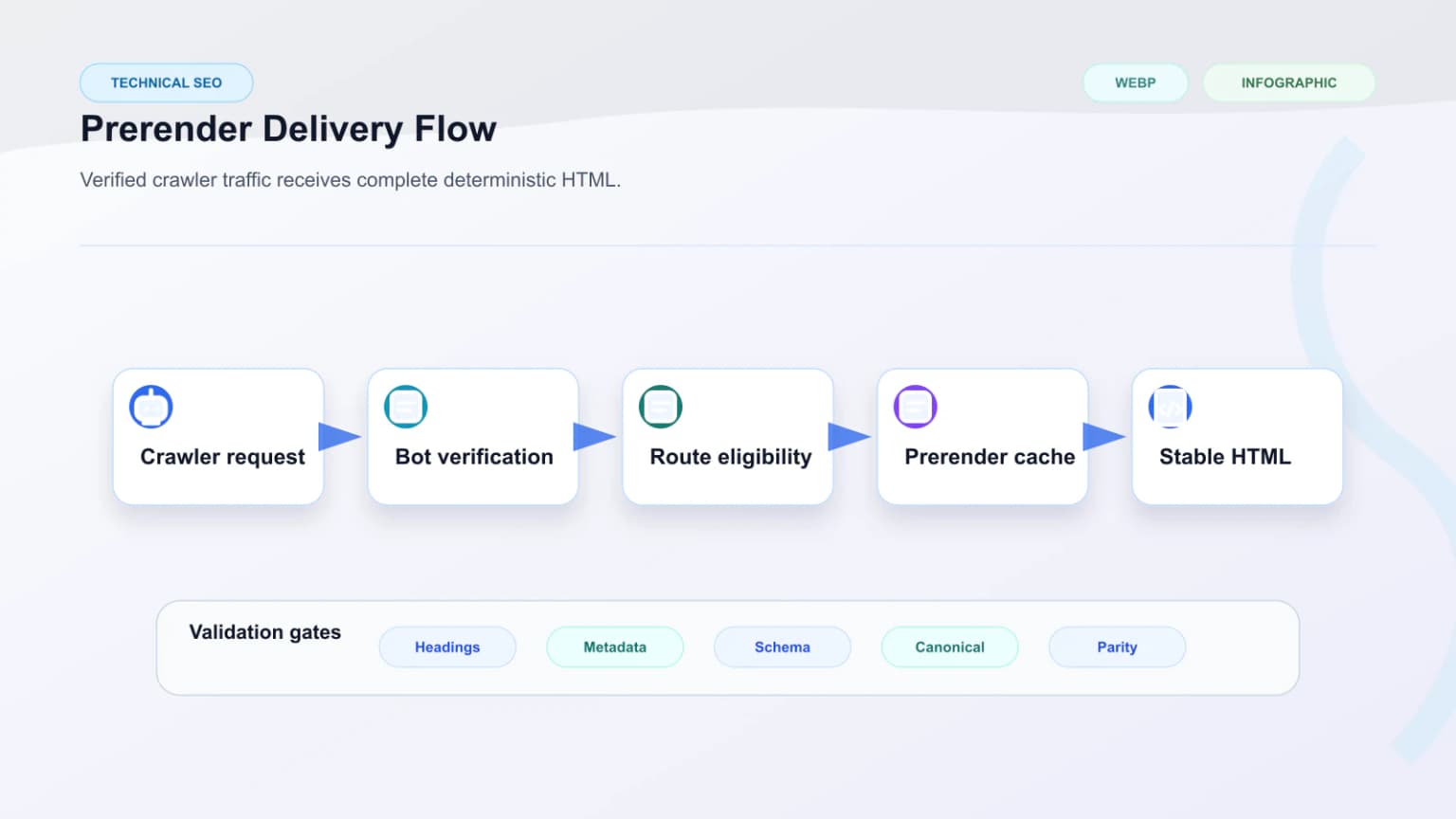
A prerendering rollout should be validated at the route and template level. That includes checking canonical consistency, title and description output, structured data presence, internal linking fidelity, and whether the prerendered response stays in sync with the source content.
Without validation, prerendering can mask one problem while introducing another, especially when cache invalidation and publishing workflows are weak. The most common post-rollout incident pattern: editor publishes new content, prerender cache does not invalidate, crawlers index stale HTML for the next 24 hours.
The minimum post-rollout validation checklist
The fastest way to verify prerendering shipped correctly is a curl-based diff between the prerendered response and the live human-facing render:
# Fetch as Googlebot (prerendered path)
curl -s -A "Mozilla/5.0 (compatible; Googlebot/2.1; +http://www.google.com/bot.html)" \
  https://example.com/affected-route > /tmp/bot.html

# Fetch as a regular browser
curl -s -A "Mozilla/5.0 (Macintosh; Intel Mac OS X 10_15_7) AppleWebKit/537.36" \
  https://example.com/affected-route > /tmp/human.html

# Diff the canonical, title, and structured data extracted from each
grep -E '<title>|canonical|application/ld\+json' /tmp/bot.html
grep -E '<title>|canonical|application/ld\+json' /tmp/human.html
The two responses should reflect the same canonical, title, structured data type, and main content topic. If they don't, the prerendered HTML is drifting, which crosses into SSR cloaking risks territory and needs an immediate fix. We covered the bot-routing side of this in redirect bot traffic to prerendering and the broader release pattern in the rendering QA checklist for SEO releases.
Cache invalidation patterns that work
Three patterns we use to keep prerendered content fresh:
- Webhook-triggered invalidation, CMS publish event hits a webhook that clears the prerender cache for the affected slugs
- TTL with stale-while-revalidate, typical TTL 5–60 minutes, fast enough for most editorial cycles
- On-demand revalidation API, a private endpoint the build pipeline calls after deploys to clear the prerender cache for changed routes
Skip TTL-only patterns for sites with breaking news or rapid editorial cycles. A 24-hour TTL on a news site means content is invisible to crawlers for a full day after publish.
How Prerendering Supports AI Search Visibility
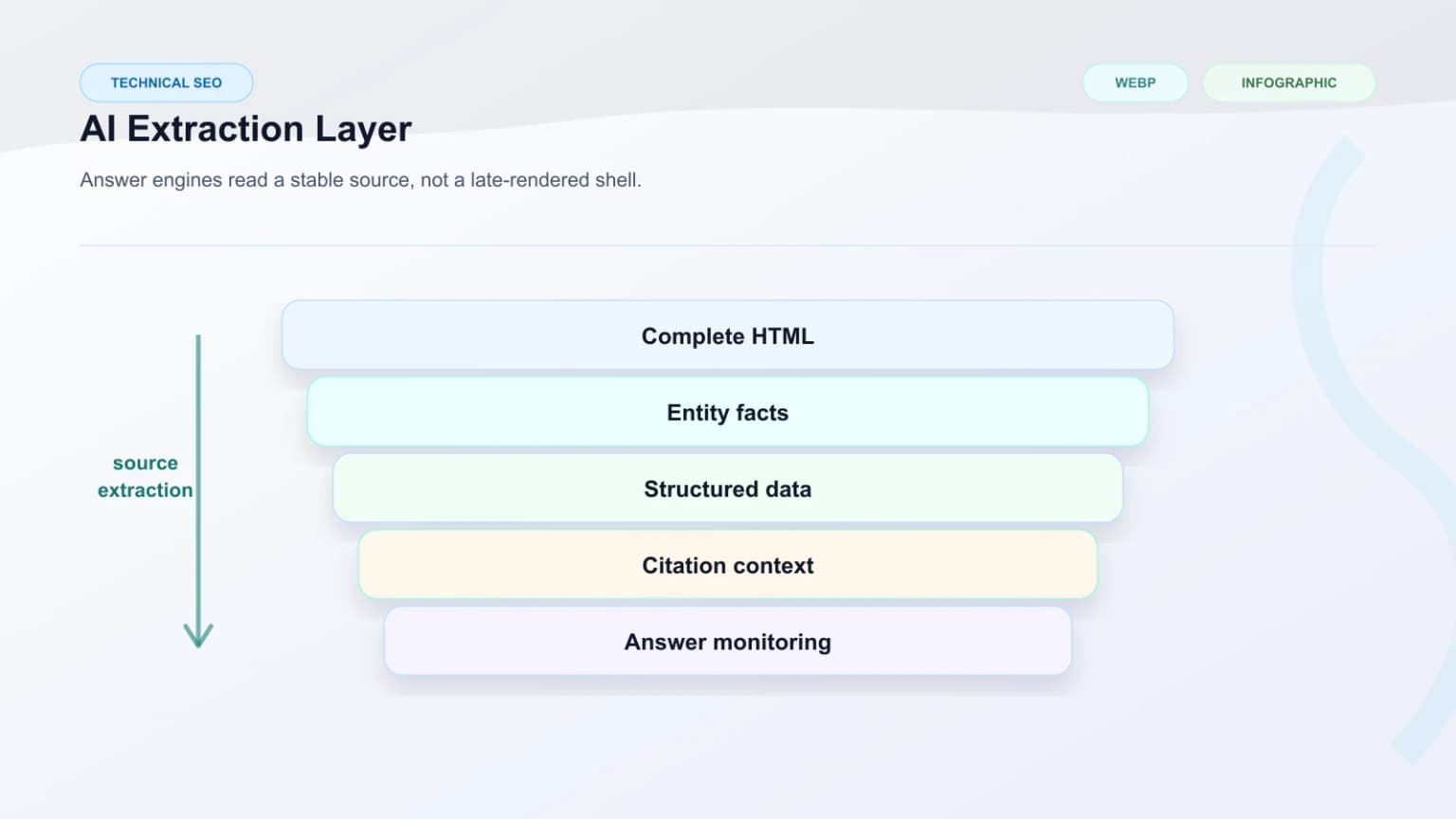
AI-driven search surfaces still depend on machine-readable, stable source material, the same property Google relied on when describing dynamic rendering as a workaround for JavaScript-heavy sites. Prerendered HTML makes important content easier to extract, cite, and trust because the response is less dependent on delayed execution paths. That is why prerendering often supports a wider AI search visibility program.
That does not replace structured data or strong information design, but it strengthens the technical foundation those layers depend on. If your team is comparing delivery models, the external What Is Prerendering guide is also a useful reference.
Which AI crawlers actually benefit
Different AI crawlers handle JavaScript differently in 2026:
| Crawler | Executes JS? | Prerendering benefit |
|---|---|---|
| Googlebot (Web) | Yes (with budget limits) | Moderate, helps under heavy JS |
| Bingbot | Limited | Strong |
| GPTBot (OpenAI) | No | Strong |
| ClaudeBot (Anthropic) | No | Strong |
| PerplexityBot | No | Strong |
| Bytespider | No | Strong |
| Common Crawl (CCBot) | No | Strong |
The pattern is consistent: search engines have invested in JS rendering capability; AI engines mostly have not. Sites that want both kinds of visibility need to ship complete HTML in the first response, which is exactly what prerendering does. We covered the bot landscape in bot detection and offloading bot visits.
Pairing prerendering with structured data
Prerendering on its own gives crawlers complete HTML. Pairing it with disciplined JSON-LD gives AI engines structured signals to extract, author, organization, article body, FAQ, HowTo. The combined output is what makes a site eligible for citations in ChatGPT, Perplexity answers, and Google AI Overviews.
The patterns are mapped in structured data for AI visibility and entity SEO and citation readiness for AI search.
How to Decide if Prerendering Is Worth It
The decision should be based on the value of the affected routes, the reliability of the current rendering path, and the operational cost of the fix. If high-value pages are unstable for crawlers, prerendering is often worth evaluating seriously.
The key is not whether prerendering is fashionable. The key is whether it makes the search-facing output more deterministic and sustainable.
Build vs buy, the cost question
Once a team decides their site benefits from prerendering, the next question is who runs the cluster. We have written the full cost analysis in build vs buy prerendering. The short version:
- Below 10,000 prerendered URLs: managed services like Prerender.io or Ostr.io's managed plans win on cost and time-to-launch
- 10,000–100,000 URLs: contested zone, depends on configuration depth and team capacity
- Above 100,000 URLs: self-hosted clusters become 2–4x cheaper than managed and offer the configuration flexibility large catalogs need
Real cost ranges in 2026:
- Managed: $90–$400/month for typical mid-market sites; $1,000+/month for enterprise scale
- Self-hosted: $250–$3,500/month infrastructure, plus $5,000–$20,000 setup and 4–16 hours/month maintenance
When prerendering is the wrong call
A few situations where teams should pause before committing:
- The framework already ships complete HTML, verify with curl before adding a layer
- The team will not have engineering capacity to operate the cluster (managed becomes the only option, and that may not fit the configuration needs)
- The site is small enough that SSG would solve the same problem more cheaply
- The rendering issue is actually a structured data problem masquerading as a rendering problem
We have shipped audits where the recommendation was "do not prerender", the problem was incomplete schema, not incomplete HTML. The diagnostic in how to test if your site needs prerendering catches this distinction.
Common Engineering Mistakes
Patterns we see when prerendering goes wrong:
- Adding prerendering to a site that already ships complete server HTML, extra layer, no payoff
- Setting cache TTL too long, so editorial publishes don't reach crawlers for a day
- Skipping the rendering parity check, so the prerendered version drifts from the live UI
- Routing all traffic (humans included) to the prerender cluster, causing latency for real users
- Choosing managed prerendering without testing whether it handles your specific AI crawlers, most managed services lag on new bots by 1–2 quarters
- Treating "we shipped prerendering" as the goal instead of "crawlers receive complete HTML for our key routes"
- Building a self-hosted cluster on AWS Lambda without realizing cold starts kill the use case
- Not invalidating cache on CMS publish, so structured data references stale dates and authors
The teams that ship prerendering well treat it as one component in a larger SEO system, not a silver bullet. Validation, monitoring, and cache discipline matter as much as the rendering pass itself.
Conclusion
Prerendering is a delivery tool, not a brand. Use it where determinism matters most, validate it at the template level, and measure the result against how reliably crawlers and AI engines can consume your content. Pair it with disciplined canonical logic, structured data in the first response, and a cache strategy that respects editorial cadence, and the layer earns its keep.
Where prerendering does not earn its keep: sites that already ship complete HTML, content with weak underlying quality, or teams that buy a managed plan without first running the diagnostic that decides whether the site needs prerendering at all. Treat the decision as a sequence, diagnose, choose the rendering model, decide build vs buy, and the result is an investment that compounds rather than a layer that drifts.
Content Cocoon
Prerendering Editorial Cluster
This article should connect readers back to the service path, to the JavaScript SEO problem it solves, and to authoritative external resources about prerendering behavior and tool validation.
Internal Pathways
Prerendering Service
The core service page for teams evaluating prerendering as a search-facing delivery strategy.
JavaScript SEO
A related service for diagnosing why the current rendering path is failing crawlers.
AI Search Visibility
Relevant when prerendering supports answer-engine extraction and machine-readable visibility.
External Technical References
What Is Prerendering
A concise external reference on prerendering fundamentals.
SSR vs SSG and Prerendering Alternatives
Helpful when comparing different rendering models and tradeoffs.
Prerender Checker
A practical tool for validating whether prerendered output is being served correctly.
Bridge CDN, crawler delivery at the edge
An edge platform in development that treats search crawlers and AI agents as first-class clients of the CDN layer instead of an afterthought.
Frequently Asked Questions
Is prerendering only for JavaScript SEO?+
It is most useful there, but it also supports broader goals around consistency, crawler performance, and AI-facing HTML reliability.
Can prerendering be selective?+
Yes. Many teams prerender only the routes where stable crawler-facing HTML matters most.