Headless CMS setups give engineering teams real flexibility, content lives in one system, the frontend lives in another, and the two communicate through an API. The tradeoff is that responsibility for technical SEO splits between the two. The CMS owns the content model. The frontend owns the rendering. Neither owns the seam, and that seam is where most headless SEO problems live.
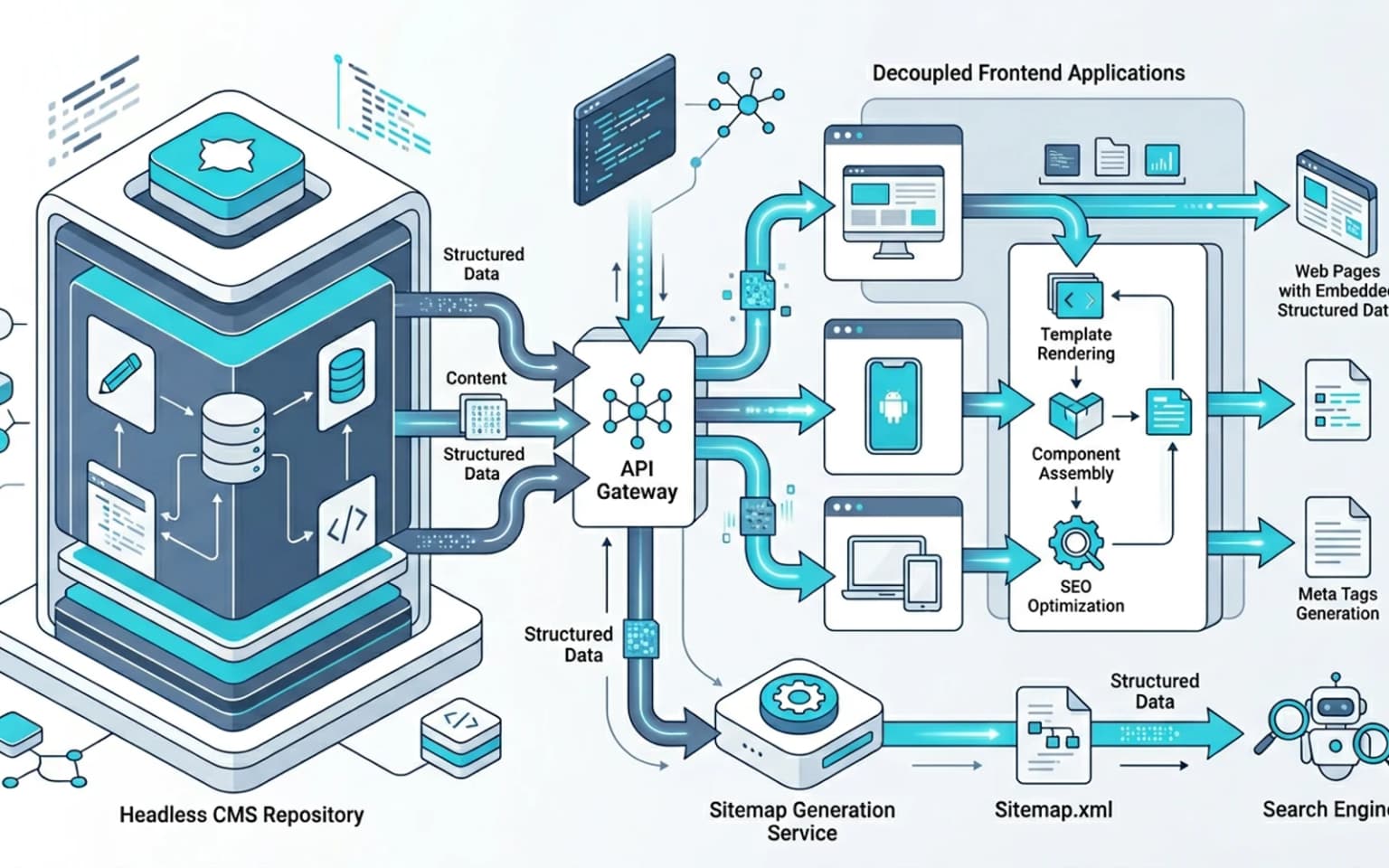
Updated for April 2026, this guide walks through the technical SEO patterns that work across headless CMS platforms (Sanity, Contentful, Strapi, Hygraph, Storyblok, Payload), what tends to break at the API/rendering seam, and how to set up the editorial workflow so SEO discipline survives without making content editors think about HTTP. Treat this as a companion to the broader JavaScript SEO work and the site taxonomy and URL architecture for large websites reference, most headless setups ship a JS frontend, which is where the rendering decisions actually matter.
What changes when you go headless
A traditional CMS, WordPress, Drupal, Webflow, owns the content model, the rendering, and the URL routing in one stack. A headless CMS owns only the content. Everything else is on the frontend.
That has three direct SEO consequences:
- Slug, canonical, meta, and structured data are content-model decisions, not template decisions. If the model does not have a
seoTitlefield, no editor will ever set one, and the frontend will fall back to the article title, which is rarely the right SEO title. - Preview/publish boundaries are fragile. A staging URL leaking into production, or a draft slug being indexed by accident, are common headless failure modes.
- Sitemap and rendering depend on a build pipeline you have to maintain. WordPress generates sitemaps automatically; in a headless setup, sitemap generation is part of the frontend build (or the CMS's webhook-triggered regeneration). Either way, it is code the team owns.
The reward is real, better Core Web Vitals on a static or hybrid frontend, an editorial experience decoupled from the public site, and a clean separation between content and presentation. But the team has to do the SEO plumbing work explicitly.
Content modeling for SEO
A good SEO-aware content model treats each search-relevant signal as a first-class field. The minimum set:
- slug, required, unique per content type, validated for format
- seoTitle, optional override for the H1/title tag, capped at 60 characters in the editor UI
- metaDescription, capped at 160 characters in the editor UI, with character count visible during editing
- canonical, optional override for cross-published or syndicated content
- ogImage, distinct from the article cover image (the OG image often needs different cropping)
- noindex, boolean for content the team wants live but not indexed
- publishedAt / updatedAt, both stored, both used in JSON-LD and sitemap
<lastmod> - author, referenced from a separate Author content type with bio, expertise, and
sameAsprofile URLs
We also recommend a relatedContent reference field so the frontend can render contextual internal links without the engineering team hard-coding them in templates. The editorial team gets control over the cocoon, covered in knowledge hub and topical authority architecture.
Field validation in the CMS, not the frontend
The editor has to see SEO constraints at write time, not at deploy time. That means validation lives in the CMS. Most platforms support this:
- Sanity, schema-level validation rules with custom validators
- Contentful, field validations including character limits and regex patterns
- Strapi, model-level validation in TypeScript schemas
- Storyblok and Hygraph, similar declarative validation in their schema editors
If the metaDescription field allows 500 characters, editors will write 500-character descriptions. If it caps at 160 with a live counter, editors will write good descriptions. Validation as a default is the leverage.
Headless CMS comparison for SEO-critical capabilities
The five platforms most teams evaluate differ in how each handles schema-level validation, on-demand revalidation, and locale modeling. The matrix below summarizes the practical defaults teams hit during implementation, not feature lists.
| CMS | Schema validation | Webhook revalidation | Multi-language support |
|---|---|---|---|
| Sanity | Code-first schemas with custom validators in JS/TS | First-class webhook triggers with GROQ filter | Field-level localization, plus internationalization plugin |
| Contentful | Declarative validations, regex, character limits | Webhook topics per content type and event | Native locale support per space, document-level |
| Strapi | TypeScript model validation in schema.json | Lifecycle hooks plus webhook configuration in admin | Built-in i18n plugin, document-level locales |
| Hygraph | Schema editor with regex and required-field rules | Webhook config per content stage and operation | Native localization on every field |
| Storyblok | Declarative validation in block schemas | Webhook + visual editor preview hooks | Field-level and folder-level localization |
The pattern across all five: validation is most useful when surfaced inside the editor UI, and revalidation is most useful when scoped to the slugs that actually changed.
Where headless architectures break SEO
Three patterns cause most of the SEO regressions we see on headless setups.
Preview/staging content leaking into production
The most common failure: a preview URL gets indexed because someone shared the link, the staging frontend isn't gated by noindex or auth, and Google adds it to the index. Now there's a duplicate content problem and the canonical strategy has to handle it.
The fix is structural:
- Staging frontend is behind basic auth or IP allowlist
- All staging routes emit
<meta name="robots" content="noindex,nofollow"> - The staging robots.txt blocks everything (
User-agent: * / Disallow: /) - Production canonical always points to production URLs, never to staging
Most teams catch one or two of those four. The full set is what keeps preview content out of search results.
Slug changes that don't trigger redirects
In WordPress, changing a slug usually creates a redirect automatically. In a headless CMS, the redirect logic is whatever the frontend implements. If the frontend doesn't implement it, a slug change is a 404 and the old URL silently loses its index position.
The pattern that works: a slugHistory field on every content type that the frontend reads to generate redirects. When an editor updates the slug, the old slug appends to the history. The frontend's middleware or rewrites layer reads the history and serves a 301 from old to new. The redirect-side mechanics are covered in HTTP status codes for SEO and crawlers.
Multi-author or multi-language content with broken canonical
Headless platforms tend to model the same piece of content as a single document with multiple locales or multiple author references. The frontend has to decide which version is canonical, how to emit hreflang, and how to avoid cannibalization.
The default canonical strategy: each language version has a self-referencing canonical, the hreflang block lists every other language version, and the default-language fallback uses x-default. The pattern is detailed in international SEO and hreflang for modern frameworks.
Rendering decisions on top of headless
The headless CMS does not decide how content reaches users. The frontend framework does. Three patterns dominate, each with different SEO tradeoffs.
Static generation (SSG)
The frontend builds every content page at build time. The CMS triggers a rebuild on publish via a webhook. Output is pure static HTML, fastest TTFB, best Core Web Vitals, simplest cache.
Tradeoff: build times grow with content volume. A site with 50,000 articles takes 30+ minutes to rebuild on every change. For most sites under 5,000 pages this is fine. Past that, hybrid models start to make sense.
Incremental Static Regeneration (ISR)
Pages are static but regenerated on demand or on a TTL. Used heavily on Next.js. The frontend serves the cached version and rebuilds the page in the background when the cache expires. This is the closest thing to "set it and forget it" for medium-to-large content sites. The mechanics, including revalidateTag and revalidatePath, are documented in the Next.js ISR reference.
Tradeoff: stale content windows. If editors expect "publish to live in 5 seconds," ISR with a 60-second TTL won't satisfy that. Pair ISR with on-demand revalidation triggered from the CMS webhook to close the staleness gap.
A minimal on-demand revalidation request from the CMS webhook usually looks like this:
curl -X POST https://example.com/api/revalidate \
  -H "Authorization: Bearer $REVALIDATE_TOKEN" \
  -H "Content-Type: application/json" \
  -d '{"slug":"my-article"}'
The frontend receives the slug, validates the bearer token against the value the CMS holds, and triggers a path-scoped revalidation. Keep the secret in environment configuration, not in the webhook body, and log every invalidation request alongside the originating CMS event for audit trails.
Server-side rendering (SSR)
Every request renders fresh from the CMS API. Best for content that changes often, paywalled content, personalized content. Worst for TTFB, every page hits the origin and waits for the CMS API.
Tradeoff: SSR-on-everything is the most common over-engineered choice on headless sites. Use it for routes that genuinely need it, not as the default. The full rendering decision matrix is in Next.js rendering decisions for SEO and AI visibility.
When prerendering helps the headless setup
If the frontend is JS-heavy and SSG isn't a fit, prerendering on top of an SSR frontend can give crawlers complete HTML without forcing the team to migrate the rendering model. We see this pattern most often when the editorial team wants instant publish but the frontend was built as a SPA with a client-side router. Prerendering catches the gap. The decision logic is covered in prerendering for technical SEO.
Sitemap generation in a headless world
Sitemap generation is a pipeline question, not a CMS feature. Two patterns work:
- Build-time generation, the frontend queries the CMS at build time, writes
sitemap.xmlto the static output. Re-run on every publish. - Runtime generation, a serverless route generates the sitemap on each request, querying the CMS for the current published list. Cached for 5 to 30 minutes.
The build-time model is simpler. The runtime model handles instant publish. We prefer build-time for sites under 10,000 pages and runtime for larger or more dynamic catalogs. The full architecture model is in XML sitemap guide for technical SEO.
What both patterns must do: emit <lastmod> from the CMS's updatedAt field, segment sitemaps by content type for large sites, and reference the sitemap in robots.txt.
Structured data on headless content
JSON-LD lives in the rendered HTML, which means the frontend generates it from CMS data at render time. The patterns that hold up:
- One schema per template type,
Articlefor blog posts,Productfor product pages,FAQPagefor FAQ pages. Don't mix. author.urlandauthor.sameAsfrom the Author content type, already covered in structured data for AI visibility.datePublishedanddateModifiedfrom CMS fields, never hardcodedimagewith explicit width and height, most CMS image APIs return this; pass it through to JSON-LD
What we see go wrong:
- Schema that exists in the rendered HTML but not in the first server response (a hydration bug, covered in SSR cloaking risks and semantic parity)
- Schema that references images on a CMS-managed CDN with no width/height in the schema block
- Schema that references author profiles that don't exist on the public site (Person without a real URL)
Validate every release in the Rich Results Test, and add a CI check that the JSON-LD parses on representative routes. The CI pattern is in Lighthouse CI for technical SEO validation.
Editorial workflow for SEO discipline
The most consistent SEO improvement on headless setups isn't a technical change, it's making the SEO fields visible at the moment of editing. Three patterns that work:
- A "publishing checklist" sidebar, at the bottom of the editor view, a panel that shows: title length, meta description length, slug format, has cover image, has alt text, has at least one internal link in the body. Most CMS platforms support custom sidebars (Sanity Studio, Contentful App Framework, Strapi plugins).
- Soft warnings, not hard blocks, if the meta description is missing, warn the editor; don't block publishing. Hard blocks train editors to fill in junk to satisfy validation.
- A "preview SEO" view, show the editor what the SERP snippet will look like (title, URL, description) at the moment they're writing. This catches truncation issues before publish.
Editors rarely think about SEO unless the tooling makes it easy to. A sidebar is the cheapest leverage you have.
Multi-language content modeling
Headless platforms model multi-language content in two patterns:
- Field-level localization, a single document with translated fields (
title.en,title.de,title.fr) - Document-level localization, separate documents per locale, linked via a shared identifier
Field-level is simpler for editors but harder to handle on the rendering side (every API call returns all languages). Document-level scales better for large content sets but requires more discipline around the shared identifier.
For SEO, what matters is that the frontend can:
- Render the correct hreflang block (every locale +
x-default) - Generate per-locale sitemaps or a single sitemap with hreflang annotations
- Handle locale-specific canonical correctly
- Map locale to URL path or subdomain consistently
The full model is in international SEO and hreflang for modern frameworks.
Common engineering mistakes
Patterns we see when teams set up headless without an SEO plan:
- Treating
seoTitleas optional at the schema level (so editors never set it) - Not implementing slug-history redirects (so URL changes silently 404)
- Forgetting to gate the staging frontend with
noindexand basic auth - Building a sitemap that doesn't update on publish (especially common with build-time generation)
- Mixing field-level and document-level localization in the same model (the worst of both worlds)
- Putting structured data behind a hydration boundary so it appears in the rendered HTML but not the first response
- Skipping the editorial sidebar, the editor team can't ship SEO discipline they don't see
Headless is a delivery decision, not a content decision. The team that owns the content model and the rendering pipeline as one system gets the SEO benefits. The team that treats the CMS as "someone else's problem" tends to lose them.
Conclusion
Technical SEO on a headless CMS is a discipline of the seam, the API contract between content and rendering. Get the content model right, validate at the schema level, automate the sitemap and redirects from CMS data, and surface SEO constraints in the editorial workflow. The reward is real engineering flexibility without giving up the parts of SEO that affect ranking.
The teams that ship reliable headless SEO treat the CMS as part of the technical SEO surface area, not as a separate world. That mental model is what compounds.
Content Cocoon
Headless CMS & Content Pipeline Cluster
Tie headless CMS work back to rendering decisions, structured data delivery, sitemap pipelines, and the editorial workflow patterns that keep SEO discipline alive at the seam between content and frontend.
Internal Pathways
Next.js Rendering Decisions for SEO and AI Visibility
The rendering layer that sits on top of every headless CMS, SSG, ISR, SSR, and the SEO tradeoffs.
Structured Data for AI Visibility
How to emit JSON-LD from CMS data so it appears in the first response, not after hydration.
XML Sitemap Guide for Technical SEO
The sitemap architecture model that headless build pipelines need to implement explicitly.
Technical SEO Audit
The parent service for teams auditing the headless CMS, the rendering layer, and the editorial workflow as one system.
External Technical References
Sanity, Schema validation reference
Schema-level validation patterns that surface SEO constraints in the editor UI.
Contentful, Field validations
Validation rules for character limits, regex patterns, and required SEO fields.
Bridge DNS, per-record origin control
Relevant when a headless split puts frontend, CMS, and API on separate names that each need their own origin, port, and Host header. Pre-launch.
Frequently Asked Questions
Is a headless CMS bad for SEO?+
No. A correctly configured headless CMS produces excellent SEO results, often better Core Web Vitals than a traditional CMS. The risk is in the seam between content modeling and rendering, where most headless SEO failures happen.
What SEO fields should every headless content model include?+
At minimum: slug, seoTitle override, metaDescription with a 160-character limit, canonical override, ogImage, noindex flag, publishedAt, updatedAt, and a referenced author. Validate these at the CMS schema level so editors see constraints at write time.
How do I handle slug changes in a headless CMS without breaking SEO?+
Add a slugHistory field to every content type. The frontend reads the history and emits 301 redirects from old slugs to the current one. Without this, slug changes turn into silent 404s and the old URLs lose their index position.
Should I use SSG, ISR, or SSR for a headless CMS site?+
SSG for sites under 5,000 pages where build time is manageable. ISR for medium-to-large content sites that need fast publish without long build times. SSR only for routes that genuinely need per-request rendering, not as the default. Pair with prerendering when crawler-facing HTML matters and the frontend is JS-heavy.